Press ? at any time to open the help overlay with a summary of all keybindings.
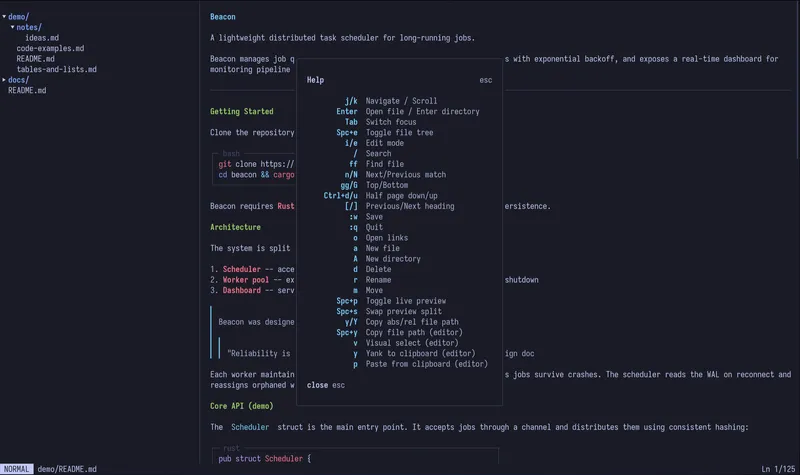
| Key | Action |
|---|
j / Down | Scroll down |
k / Up | Scroll up |
gg | Jump to top |
G | Jump to bottom |
Ctrl+d | Scroll half page down |
Ctrl+u | Scroll half page up |
Tab | Switch focus between panes |
| Key | Action |
|---|
Enter | Open file or toggle directory |
h | Collapse directory |
l | Expand directory |
Backspace | Collapse current directory |
Space+e | Toggle file tree visibility |
a | Create new file |
A | Create new directory |
d | Delete file or directory |
r | Rename file or directory |
m | Move file or directory |
ff | Open fuzzy file finder |
| Key | Action |
|---|
[ | Jump to previous heading |
] | Jump to next heading |
| Key | Action |
|---|
i / e | Enter insert mode |
Esc | Exit insert mode |
:w | Save file |
:wq / :x | Save and quit |
:q | Quit (warns if unsaved changes) |
:q! | Force quit without saving |
:e / :edit | Reload file from disk |
| Key | Action |
|---|
Space+p | Toggle live preview |
Space+s | Swap split orientation |
:preview | Toggle live preview |
| Key | Action |
|---|
/ | Start search |
Enter | Confirm search |
n | Jump to next match |
N | Jump to previous match |
Esc | Cancel search |
| Key | Action |
|---|
o | Open link picker |
? | Toggle help overlay |
q | Quit |
Ctrl+c | Force quit |