Live Preview
Live preview gives you a real-time rendered view of your markdown alongside the editor. As you type, the preview updates to reflect your changes.
Toggling live preview
Section titled “Toggling live preview”There are two ways to toggle live preview:
- Press
Space+p - Type the
:previewcommand
Split modes
Section titled “Split modes”Live preview supports two split orientations:
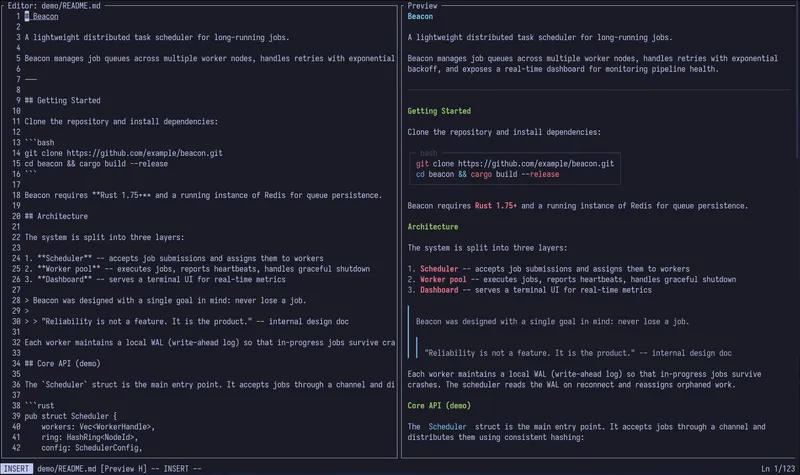
Horizontal split
Section titled “Horizontal split”The editor appears on the left and the preview on the right. This is useful on wide terminals.
Vertical split
Section titled “Vertical split”The editor appears on top and the preview on the bottom. This works well on narrower or taller terminals.
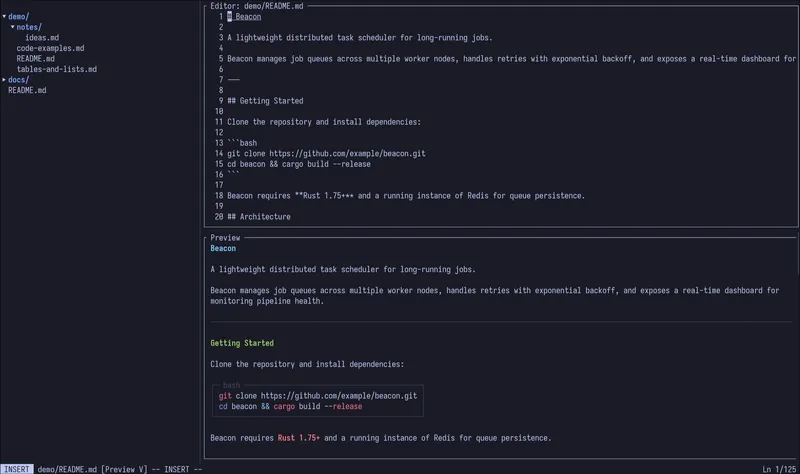
Press Space+s to swap between horizontal and vertical orientation at any time.
Debounced rendering
Section titled “Debounced rendering”To keep editing responsive, mdt debounces the preview rendering. Rather than re-rendering on every single keystroke, it waits for a brief pause in typing before updating the preview. This means you get smooth editing performance even on large documents.
Parallel scrolling
Section titled “Parallel scrolling”When live preview is active, scrolling in the editor automatically scrolls the preview pane to the corresponding position, and vice versa. This keeps both views in sync so you always see the rendered output for the text you are editing.